

- ZeroTwo desktop app
- ZeroTwo on the web
- ZeroTwo desktop app
- ZeroTwo desktop app
In the ZeroTwo desktop app, scheduled tasks can work with local projects and
run in the project directory or an isolated worktree. Keep the computer on and
the app running when a scheduled task needs local files.
When scheduled tasks are enabled for your workspace, create them from Chat or
ZeroTwo Work on the web and manage their runs from Scheduled. Web tasks
can use uploaded context and connected tools, but they can’t work directly in
a folder on your computer.
ZeroTwo desktop app doesn’t provide the Scheduled management interface. Use ZeroTwo web
or the desktop app to create and manage scheduled tasks. The CLI can help you
prepare and test a prompt, skill, or script first.
The desktop app doesn’t provide the Scheduled management interface. Use
ZeroTwo web or the desktop app to create and manage scheduled tasks. The IDE
extension can help you prepare and test a prompt, skill, or workspace change
first.
- ZeroTwo on the web
- ZeroTwo desktop app
- ZeroTwo desktop app
Manage scheduled tasks on the web
Open Scheduled to review task status and recent runs. Use a standalone scheduled task when each run should start from the saved prompt. Use a scheduled task in a chat when you want ZeroTwo to return to the same chat with its existing context.Scheduled tasks on the web can use uploaded files, connected tools, skills, and plugins available to that chat. They don’t keep a local folder or worktree available between runs. Put durable instructions in the task prompt or an attached skill, and keep required source material in an accessible project, upload, or connected service.Before you schedule a task, test its prompt in a regular web chat. Review the first few runs, then adjust the prompt, tools, or cadence if the results are too broad or need additional context.For example, schedule a task to evaluate telemetry errors and submit fixes,
or to create reports about recent codebase changes. For ongoing work that
should keep using the same context, schedule a task inside an existing chat.For project-scoped scheduled tasks, keep the machine powered on and the ZeroTwo
desktop app running. The selected project must still be available on disk when
the task is scheduled to run.In Git repositories, you can choose whether a scheduled task runs in your local
project or on a new worktree. Both options run in the
background. Worktrees keep changes from scheduled tasks separate from unfinished local
work, while running in your local project can modify files you are still
working on. In non-version-controlled projects, scheduled tasks run directly in the
project directory.You can also leave the model and reasoning effort on their default settings, or
choose them explicitly if you want more control over how the scheduled task runs.If a scheduled task uses 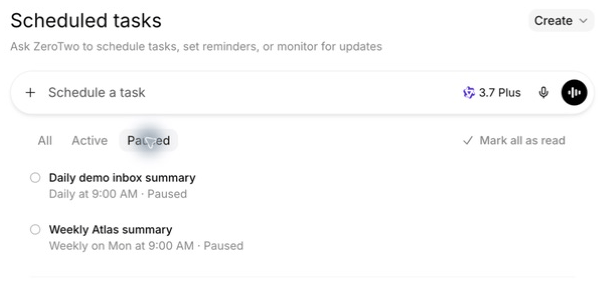
gpt-5.4 or gpt-5.4-mini with ZeroTwo sign-in,
update it before those models retire on August 31, 2026. Replace gpt-5.4 with
gpt-5.6-terra and gpt-5.4-mini with gpt-5.6-luna.Scheduled tasks run unattended with your default sandbox settings. Start with the
narrowest access that lets the task succeed, and grant network or broader file
access only when required. Understand sandboxing.Manage scheduled tasks
Find all scheduled tasks and their runs on Scheduled in the ZeroTwo desktop app sidebar.The Scheduled view acts as your inbox. Scheduled task runs with findings appear there, and an unread indicator shows when a run needs your attention.RRULE:FREQ=MONTHLY;BYMONTHDAY=1;BYHOUR=9;BYMINUTE=0.For Git repositories, each scheduled task can run either in your local project or
on a dedicated background worktree. Use
worktrees when you want to isolate scheduled-task changes from unfinished local
work. Use local mode when you want the scheduled task to work directly in your main
checkout, keeping in mind that it can change files you are actively editing.
In non-version-controlled projects, scheduled tasks run directly in the project
directory. You can have the same scheduled task run on more than one project.Scheduled tasks created with ZeroTwo Work on the web, or with ZeroTwo Work or
ZeroCode in the desktop app, can use plugins. Scheduled tasks can also use
skills. To keep scheduled tasks maintainable and shareable across teams, use
skills to define the action and provide tools and context.
Select or invoke a specific skill in the task prompt when the workflow shouldn’t
rely on automatic tool selection.
Ask ZeroTwo to create or update scheduled tasks
You can create and update scheduled tasks from a ZeroTwo or ZeroCode chat. Describe the work, the schedule, and whether each scheduled run should return to the current chat or start a new chat. ZeroTwo can draft the prompt, choose the right destination, and update the scheduled task when its scope or cadence changes.For example, ask ZeroTwo to schedule a follow-up from the current chat while a deployment finishes, or ask it to create a standalone scheduled task that checks a project on a recurring schedule.Skills can also create or update scheduled tasks. For example, a skill for babysitting a pull request could set up a scheduled task that checks the PR status with the GitHub plugin and fixes new review feedback.Schedule a task inside a chat
Schedule a task inside an existing chat when you want ZeroTwo to return to that chat on a schedule. The scheduled task uses the chat’s existing context instead of starting from a new prompt each time.Scheduled tasks in a chat can use minute-based intervals for active follow-up loops, or daily and weekly schedules when you need a check-in at a specific time.Schedule a task inside a chat for:- checking a long-running operation until it finishes
- polling Slack, GitHub, or another connected source when the results should stay in the same chat
- reminding ZeroTwo to continue a review loop at a fixed cadence
- running a skill-driven workflow that uses plugins, such as checking PR status and addressing new feedback
- continuing an ongoing research or triage chat without losing its context
Test scheduled tasks
Before you schedule a task, test the prompt manually in a regular chat first. This helps you confirm:- The prompt is clear and scoped correctly.
- The selected or default model, reasoning effort, and tools behave as expected.
- The resulting output is reviewable.
In the ZeroTwo desktop app, you can explicitly trigger a skill in a scheduled
task prompt by using Afterward, create a new scheduled task:
$skill-name.Worktree cleanup for scheduled tasks
If you choose worktrees for Git repositories, frequent schedules can create many worktrees over time. Archive scheduled runs you no longer need, and avoid pinning runs unless you intend to keep their worktrees.Permissions and security model
Scheduled tasks run unattended and use your default sandbox settings.For a plain-language explanation of these boundaries, see the sandboxing overview. For filesystem and network rules, see Permissions.- If your sandbox mode is read-only, tool calls fail if they require modifying files, accessing network, or working with apps on your computer. Consider updating sandbox settings to workspace write.
- If your sandbox mode is workspace-write, tool calls fail if they require modifying files outside the workspace, accessing network, or working with apps on your computer. You can selectively allowlist commands to run outside the sandbox using rules.
- If your sandbox mode is full access, background scheduled tasks carry elevated risk, as ZeroTwo may change files, run commands, and access network without asking. Consider updating sandbox settings to workspace write, and using rules to selectively define which commands the agent can run with full access.
approval_policy = "never" or constrain allowed sandbox modes. See
Admin-enforced requirements (requirements.toml).Scheduled tasks use approval_policy = "never" when your organization policy
allows it. If admin requirements disallow approval_policy = "never",
scheduled tasks fall back to the approval behavior of your selected permission
mode.Examples
Automatically create new skills
Scan all of the `~/.zerotwo/sessions` files from the past day and if there have been any issues using particular skills, update the skills to be more helpful. Personal skills only, no repo skills.

If there’s anything we’ve been doing often and struggle with that we should save as a skill to speed up future work, let’s do it.

Definitely don't feel like you need to update any- only if there's a good reason!

Let me know if you make any.
Stay up-to-date with your project
Look at the latest remote origin/master or origin/main . Then produce an exec briefing for the last 24 hours of commits that touch <DIRECTORY>

Formatting + structure:

- Use rich Markdown (H1 workstream sections, italics for the subtitle, horizontal rules as needed).
- Preamble can read something like “Here’s the last 24h brief for <directory>:”
- Subtitle should read: “Narrative walkthrough with owners; grouped by workstream.”
- Group by workstream rather than listing each commit. Workstream titles should be H1.
- Write a short narrative per workstream that explains the changes in plain language.
- Use bullet points and bolding when it makes things more readable
- Feel free to make bullets per person, but bold their name

Content requirements:

- Include PR links inline (e.g., [#123](...)) without a “PRs:” label.
- Do NOT include commit hashes or a “Key commits” section.
- It’s fine if multiple PRs appear under one workstream, but avoid per‑commit bullet lists.

Scope rules:

- Only include changes within the current cwd (or main checkout equivalent)
- Only include the last 24h of commits.
- Use `gh` to fetch PR titles and descriptions if it helps.
  Also feel free to pull PR reviews and comments
Combining scheduled tasks with skills to fix your own bugs
Create a new skill that tries to fix a bug introduced by your own commits by creating a new$recent-code-bugfix and store it in your personal skills.---
name: recent-code-bugfix
description: Find and fix a bug introduced by the current author within the last week in the current working directory. Use when a user wants a proactive bugfix from their recent changes, when the prompt is empty, or when asked to triage/fix issues caused by their recent commits. Root cause must map directly to the author’s own changes.
---
# Recent Code Bugfix
## Overview
Find a bug introduced by the current author in the last week, implement a fix, and verify it when possible. Operate in the current working directory, assume the code is local, and ensure the root cause is tied directly to the author’s own edits.
## Workflow
### 1) Establish the recent-change scope
Use Git to identify the author and changed files from the last week.
- Determine the author from `git config user.name`/`user.email`. If unavailable, use the current user’s name from the environment or ask once.
- Use `git log --since=1.week --author=<author>` to list recent commits and files. Focus on files touched by those commits.
- If the user’s prompt is empty, proceed directly with this default scope.
### 2) Find a concrete failure tied to recent changes
Prioritize defects that are directly attributable to the author’s edits.
- Look for recent failures (tests, lint, runtime errors) if logs or CI outputs are available locally.
- If no failures are provided, run the smallest relevant verification (single test, file-level lint, or targeted repro) that touches the edited files.
- Confirm the root cause is directly connected to the author’s changes, not unrelated legacy issues. If only unrelated failures are found, stop and report that no qualifying bug was detected.
### 3) Implement the fix
Make a minimal fix that aligns with project conventions.
- Update only the files needed to resolve the issue.
- Avoid adding extra defensive checks or unrelated refactors.
- Keep changes consistent with local style and tests.
### 4) Verify
Attempt verification when possible.
- Prefer the smallest validation step (targeted test, focused lint, or direct repro command).
- If verification cannot be run, state what would be run and why it wasn’t executed.
### 5) Report
Summarize the root cause, the fix, and the verification performed. Make it explicit how the root cause ties to the author’s recent changes.
Check my commits from the last 24h and submit a $recent-code-bugfix.