

Start a review
- ZeroTwo on the web
- ZeroTwo desktop app
- ZeroTwo desktop app
- ZeroTwo desktop app
In ZeroTwo Work, upload the code you want reviewed or make it available through
an installed source plugin. In your prompt, identify the pull
request, branch, commit, files, and review criteria.
Review in the app
Open the review pane to understand what changed, give line-specific feedback, and decide what to stage, revert, commit, or push.To ask ZeroCode to review the changes, type/review in the composer. Choose
Review against a base branch or Review uncommitted changes. ZeroCode reports
prioritized findings without changing your working tree.The review pane requires a project inside a Git repository. If your project
isn’t a Git repository yet, the app prompts you to create one.Type
/review to open the CLI review presets. ZeroCode starts a dedicated reviewer
that reads the selected diff and reports prioritized, actionable findings
without changing your working tree.Type
/review in the desktop app composer. Choose Review against a base
branch or Review uncommitted changes. ZeroCode reports prioritized findings
without changing your working tree.The /review command appears only when the open project is inside a Git
repository.Choose a review scope
- ZeroTwo on the web
- ZeroTwo desktop app
- ZeroTwo desktop app
- ZeroTwo desktop app
Name the pull request, branch, commit, or files to inspect in your prompt. To
review local files that aren’t available through an installed source plugin,
upload them to the chat.
What changes it shows
The review pane reflects the state of your Git repository, not just what ZeroCode edited. It includes changes made by ZeroCode, changes you made yourself, and any other uncommitted changes in the repository.By default, the review pane shows Unstaged changes. Use Staged for the Git index, Commit for a selected commit, Branch for the diff against your base branch, or Last turn for the most recent assistant turn.Review multiple repositories
When a local project includes multiple folders backed by different Git repositories, the review pane can show changes from each repository. Open the repository selector in the review header to inspect another repository and see the lines added or removed without leaving the current review pane.Choose Last turn to see the assistant’s latest changes across the attached repositories. The repository selector shows All repos for that view. Other review scopes, such as Unstaged, Staged, and Branch, apply to the repository you select.Choose one of these
/review scopes:- Review against a base branch finds the merge base and reviews your branch diff.
- Review uncommitted changes includes staged, unstaged, and untracked files.
- Review a commit reviews the exact change set for a selected commit.
- Custom review instructions focuses the review on criteria you provide.
Choose one of these
/review scopes:- Review against a base branch compares your current branch with a branch you select.
- Review uncommitted changes reviews the changes in your working tree.
Work with review results
- ZeroTwo on the web
- ZeroTwo desktop app
- ZeroTwo desktop app
- ZeroTwo desktop app
- ZeroTwo on the web
- ZeroTwo desktop app
Review findings appear in the web chat. Ask for evidence, request a
narrower follow-up review, or ask ZeroTwo to prepare revised files.
Code review results
Review findings appear as inline comments in the review pane.Reviews run in the current chat by default. Under Settings > General > Code review, choose Detached to start a separate review chat. See developer settings.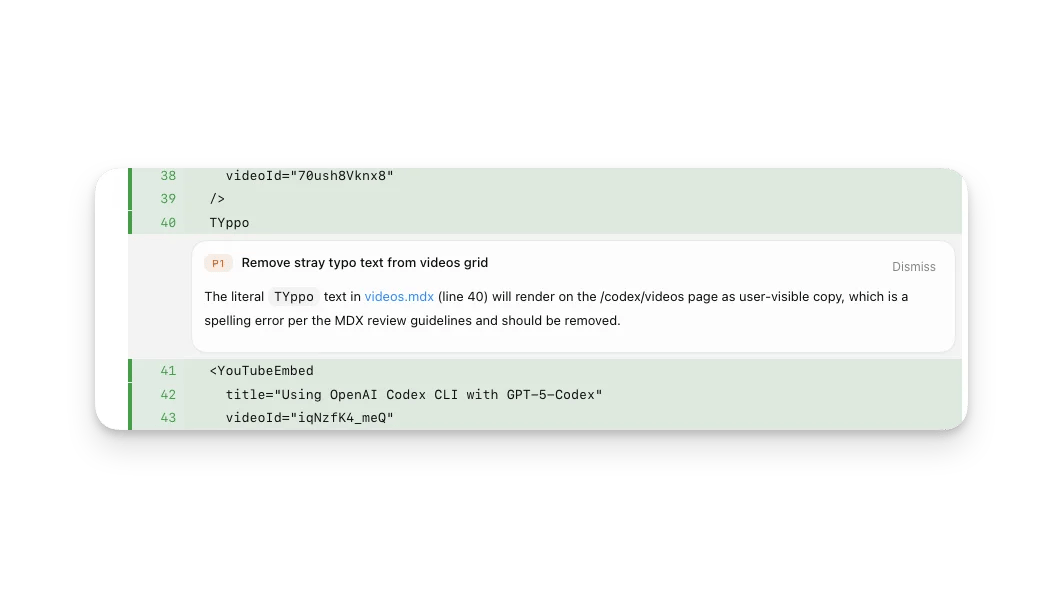
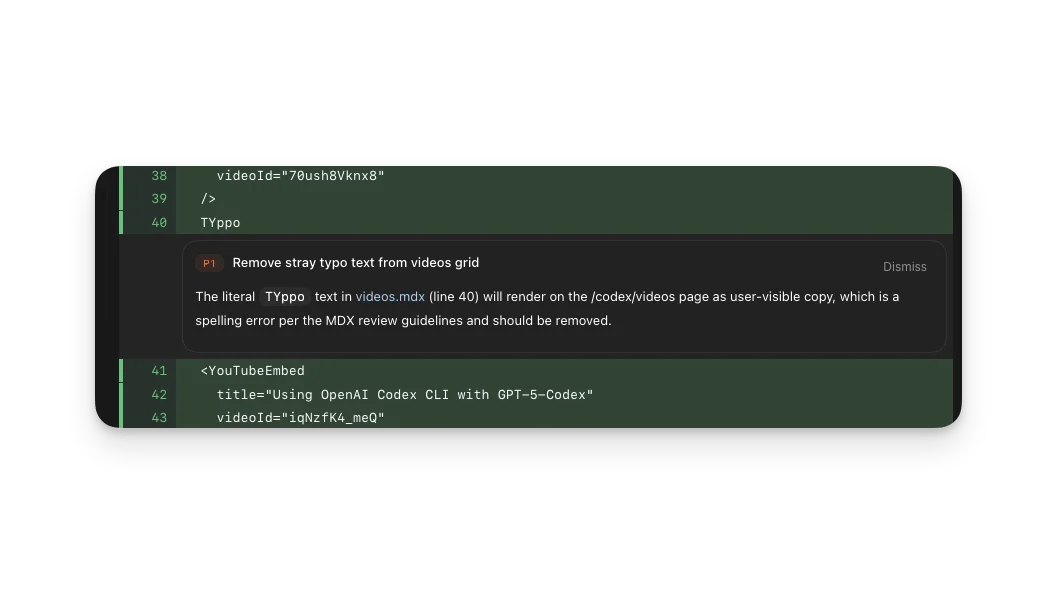
The review appears as a turn in the transcript. Set
review_model in
config.toml when you want reviews to use a different model from the current
session.By default, the review runs in the current chat. Set
chatgpt.reviewDelivery to
detached when you want /review to start a separate review chat. See the
desktop app settings reference.If you ask ZeroTwo to prepare revised files, the tools and workspace
permissions available to the chat still apply.
If you ask ZeroCode to apply the fixes it finds, your normal sandbox and approval
settings apply.
Navigating the review pane
- Clicking a file name typically opens that file in your chosen editor. You can choose the default editor in developer settings.
- Clicking the file name background expands or collapses the diff.
- Clicking a single line while holding Cmd pressed opens the line in your chosen editor.
- If you’re happy with a change, you can stage it or revert changes you don’t want.
Inline comments for feedback
Inline comments let you attach feedback directly to specific lines in the diff. This is often the fastest way to guide ZeroCode to the right fix.To leave an inline comment:- Open the review pane.
- Hover over the line you want to comment on.
- Select the + button that appears.
- Write your feedback and submit it.
- After you finish leaving feedback, send a message back to the chat.
Pull request reviews
When ZeroCode has GitHub access for your repository and the current project is on the pull request branch, the ZeroTwo desktop app can help you work through pull request feedback without leaving the app. The sidebar shows pull request context and feedback from reviewers, and the review pane shows comments alongside the diff so you can ask ZeroCode to address issues in the same chat.Install the GitHub CLI (gh) and authenticate it with gh auth login so ZeroCode
can load pull request context, review comments, and changed files. If gh is
missing or unauthenticated, pull request details may not appear in the sidebar
or review pane.Use this flow when you want to keep the full fix loop in one place:- Open the review pane on the pull request branch.
- Review the pull request context, comments, and changed files.
- Ask ZeroCode to fix the specific comments you want handled.
- Inspect the resulting diff in the review pane.
- Stage, commit, and push the changes to the pull request branch when you’re ready.
Staging and reverting files
The review pane includes Git actions so you can shape the diff before you commit.You can stage, unstage, or revert changes at these levels:- Entire diff: Use the action buttons in the review header, such as Stage all or Revert all.
- Per file: Stage, unstage, or revert an individual file.
- Per hunk: Stage, unstage, or revert a single hunk.