> ## Documentation Index
> Fetch the complete documentation index at: https://docs.zerotwo.ai/llms.txt
> Use this file to discover all available pages before exploring further.
# Welcome to ZeroTwo
> One platform. Every AI model. All your tools. Work smarter, faster, and more creatively.
 ## What is ZeroTwo?
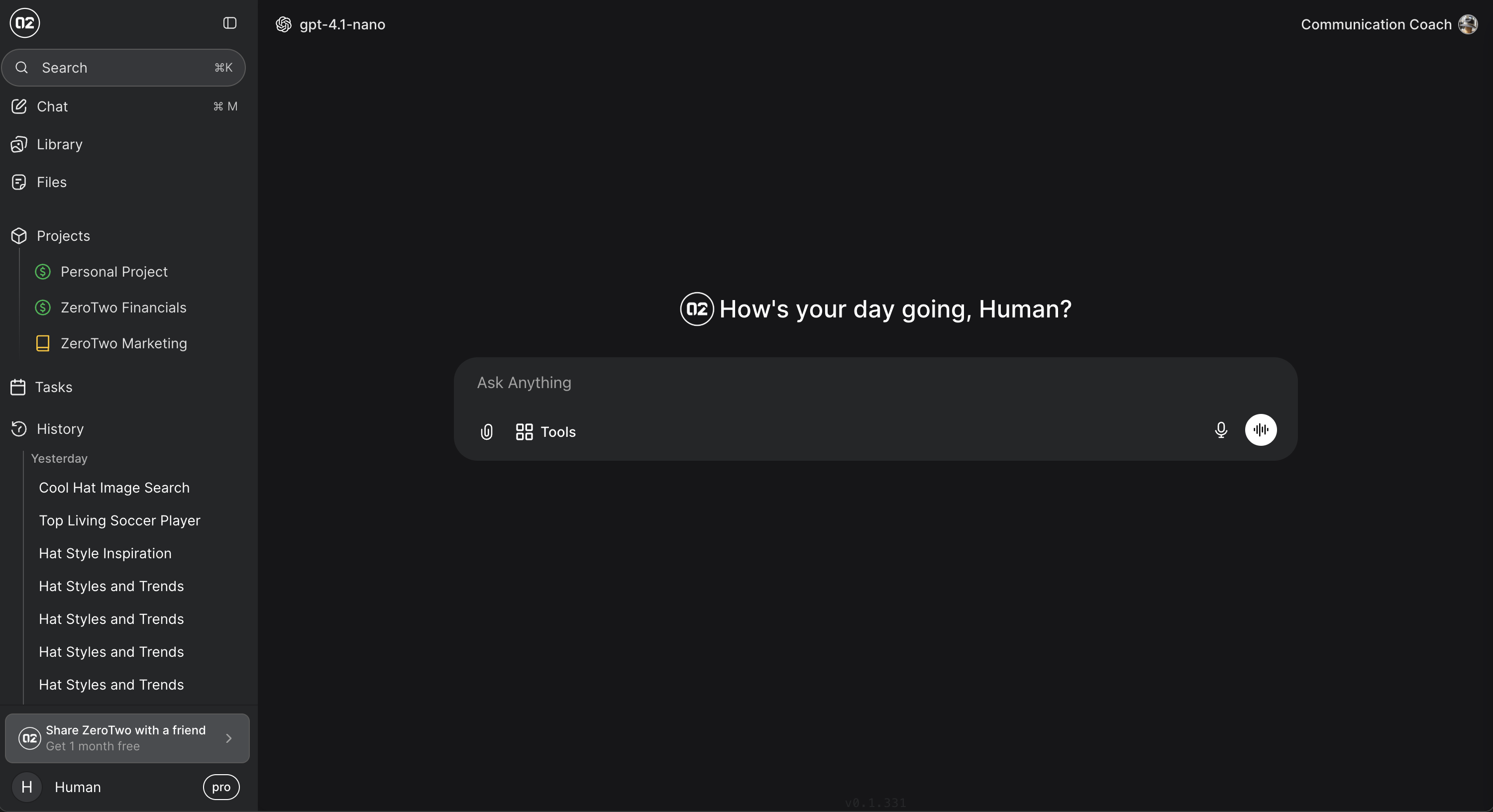
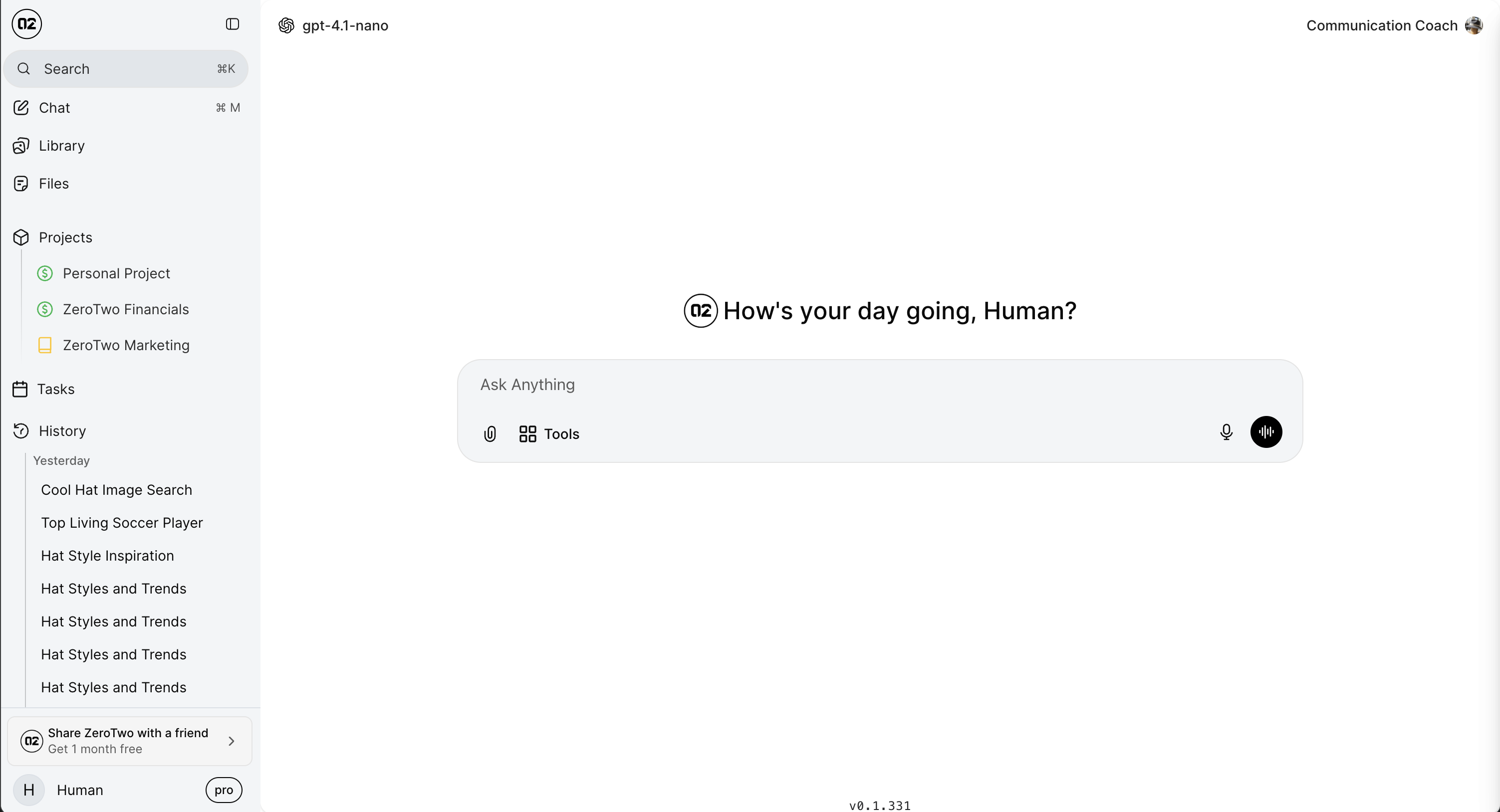
ZeroTwo is the all-in-one AI platform that replaces the subscription sprawl. Instead of juggling multiple AI services, you get **every leading AI model**, **powerful tools**, and **seamless integrations** in a single workspace—saving you money without sacrificing capability.
Chat with OpenAI, Anthropic, Google Gemini, Mistral, DeepSeek, and 40+ other models in one place
Canvas editing, web search, deep research, code interpreter, image generation, and more
Connect Google Drive, Gmail, GitHub, Linear, Notion, and dozens of other services
Projects, shared chats, role-based permissions, and organization-wide knowledge sharing
## Why Choose ZeroTwo?
Stop switching between ChatGPT, Claude, Perplexity, and other AI platforms. ZeroTwo combines all their capabilities in a single, unified interface.
**What you get:**
* 40+ AI models from top providers (OpenAI, Anthropic, Google, Mistral, and more)
* Advanced tools like Canvas, Web Search, Deep Research, Code Interpreter
* Native integrations with Google Workspace, GitHub, Notion, Linear, and more
* Enterprise-grade features at a fraction of the cost
Replace half a dozen AI subscriptions with one powerful platform. No hidden costs, no usage limits that surprise you at the end of the month.
**Cost savings:**
* One subscription replaces ChatGPT Plus, Claude Pro, Perplexity Pro, and more
* Pay-as-you-go pricing for advanced models
* No surprise bills from multiple services
* Transparent usage tracking
Built-in tools that extend AI capabilities beyond simple chat:
* **Canvas**: Create and edit documents, code, and content in real-time
* **Web Search**: Get up-to-date information from the web instantly
* **Deep Research**: Multi-agent research system for comprehensive analysis
* **Code Interpreter**: Execute Python code in a secure sandbox
* **Image & Video Generation**: Create visual content with top AI models
* **Memory System**: AI that remembers context across conversations
Integrate with the tools you already use:
**Direct Integrations:**
* Google Drive, Gmail, Calendar, Contacts
* GitHub, Linear, Notion
* Canva, Box, Dropbox
* Supabase, PostgreSQL
**MCP (Model Context Protocol):**
* Extensible integration framework
* Connect any tool or service
* Custom integrations for your specific needs
## Get Started in Minutes
Sign up with your email or Google account. No credit card required to start exploring.
Step-by-step account setup guide
Familiarize yourself with the interface, model selector, and core features.
Learn the ZeroTwo interface
Choose an AI model and start a conversation. Try different models to find your favorites.
Begin chatting with AI models
Enable tools, connect integrations, and unlock the full power of ZeroTwo.
Add Canvas, Web Search, and more
Integrate your workflow
## Popular Use Cases
Use Claude Sonnet 4 for coding, debugging, and technical documentation. Connect GitHub and Linear for seamless development workflows.
Write, edit, and design content with Canvas. Generate images and videos to enhance your creative projects.
Perform comprehensive research with Deep Research mode. Search the web, analyze data, and synthesize insights.
Create projects for your team. Share chats, organize knowledge, and collaborate with role-based permissions.
Upload datasets and use Code Interpreter to analyze, visualize, and extract insights from your data.
Connect Gmail, Google Calendar, Notion, and other tools to automate repetitive tasks with AI assistance.
## What Makes ZeroTwo Different?
**All-in-One Platform**: ZeroTwo isn't just another AI chat interface. It's a complete workspace that combines chat, tools, integrations, and collaboration features that would normally require multiple subscriptions.
Switch between OpenAI, Anthropic, Google, Mistral, DeepSeek, Groq, and more—all in one chat
Canvas, Web Search, Deep Research, Code Interpreter, Image Generation, Video Generation
Google Workspace, GitHub, Linear, Notion, Supabase, and extensible MCP support
Projects, shared chats, role-based permissions, organization management
AI that remembers context across conversations using advanced memory technology
Create specialized AI assistants with custom instructions, knowledge, and behavior
## Explore the Documentation
Learn about ZeroTwo's capabilities and features
Quick start guide to get up and running
Browse all available AI models and their capabilities
Discover powerful tools that extend AI capabilities
Connect your favorite tools and services
Set up collaborative workspaces for your team
## Need Help?
Common questions and answers for new users
Solutions to common issues and error messages
Contact our support team for assistance
Join our Discord community to connect with other users
Ready to replace your AI subscription sprawl? [Get started with ZeroTwo today](https://zerotwo.ai) and experience the power of every AI model in one platform.
## What is ZeroTwo?
ZeroTwo is the all-in-one AI platform that replaces the subscription sprawl. Instead of juggling multiple AI services, you get **every leading AI model**, **powerful tools**, and **seamless integrations** in a single workspace—saving you money without sacrificing capability.
Chat with OpenAI, Anthropic, Google Gemini, Mistral, DeepSeek, and 40+ other models in one place
Canvas editing, web search, deep research, code interpreter, image generation, and more
Connect Google Drive, Gmail, GitHub, Linear, Notion, and dozens of other services
Projects, shared chats, role-based permissions, and organization-wide knowledge sharing
## Why Choose ZeroTwo?
Stop switching between ChatGPT, Claude, Perplexity, and other AI platforms. ZeroTwo combines all their capabilities in a single, unified interface.
**What you get:**
* 40+ AI models from top providers (OpenAI, Anthropic, Google, Mistral, and more)
* Advanced tools like Canvas, Web Search, Deep Research, Code Interpreter
* Native integrations with Google Workspace, GitHub, Notion, Linear, and more
* Enterprise-grade features at a fraction of the cost
Replace half a dozen AI subscriptions with one powerful platform. No hidden costs, no usage limits that surprise you at the end of the month.
**Cost savings:**
* One subscription replaces ChatGPT Plus, Claude Pro, Perplexity Pro, and more
* Pay-as-you-go pricing for advanced models
* No surprise bills from multiple services
* Transparent usage tracking
Built-in tools that extend AI capabilities beyond simple chat:
* **Canvas**: Create and edit documents, code, and content in real-time
* **Web Search**: Get up-to-date information from the web instantly
* **Deep Research**: Multi-agent research system for comprehensive analysis
* **Code Interpreter**: Execute Python code in a secure sandbox
* **Image & Video Generation**: Create visual content with top AI models
* **Memory System**: AI that remembers context across conversations
Integrate with the tools you already use:
**Direct Integrations:**
* Google Drive, Gmail, Calendar, Contacts
* GitHub, Linear, Notion
* Canva, Box, Dropbox
* Supabase, PostgreSQL
**MCP (Model Context Protocol):**
* Extensible integration framework
* Connect any tool or service
* Custom integrations for your specific needs
## Get Started in Minutes
Sign up with your email or Google account. No credit card required to start exploring.
Step-by-step account setup guide
Familiarize yourself with the interface, model selector, and core features.
Learn the ZeroTwo interface
Choose an AI model and start a conversation. Try different models to find your favorites.
Begin chatting with AI models
Enable tools, connect integrations, and unlock the full power of ZeroTwo.
Add Canvas, Web Search, and more
Integrate your workflow
## Popular Use Cases
Use Claude Sonnet 4 for coding, debugging, and technical documentation. Connect GitHub and Linear for seamless development workflows.
Write, edit, and design content with Canvas. Generate images and videos to enhance your creative projects.
Perform comprehensive research with Deep Research mode. Search the web, analyze data, and synthesize insights.
Create projects for your team. Share chats, organize knowledge, and collaborate with role-based permissions.
Upload datasets and use Code Interpreter to analyze, visualize, and extract insights from your data.
Connect Gmail, Google Calendar, Notion, and other tools to automate repetitive tasks with AI assistance.
## What Makes ZeroTwo Different?
**All-in-One Platform**: ZeroTwo isn't just another AI chat interface. It's a complete workspace that combines chat, tools, integrations, and collaboration features that would normally require multiple subscriptions.
Switch between OpenAI, Anthropic, Google, Mistral, DeepSeek, Groq, and more—all in one chat
Canvas, Web Search, Deep Research, Code Interpreter, Image Generation, Video Generation
Google Workspace, GitHub, Linear, Notion, Supabase, and extensible MCP support
Projects, shared chats, role-based permissions, organization management
AI that remembers context across conversations using advanced memory technology
Create specialized AI assistants with custom instructions, knowledge, and behavior
## Explore the Documentation
Learn about ZeroTwo's capabilities and features
Quick start guide to get up and running
Browse all available AI models and their capabilities
Discover powerful tools that extend AI capabilities
Connect your favorite tools and services
Set up collaborative workspaces for your team
## Need Help?
Common questions and answers for new users
Solutions to common issues and error messages
Contact our support team for assistance
Join our Discord community to connect with other users
Ready to replace your AI subscription sprawl? [Get started with ZeroTwo today](https://zerotwo.ai) and experience the power of every AI model in one platform.